Your journey begins here.
AI Scenario is a platform for Interactive Storytelling. Think of it like a collaborative novel or a tabletop roleplaying game, where you are the main character and an advanced AI acts as the narrator, world, and every other character you meet. Whether you want to explore a cyberpunk city, survive a zombie apocalypse, or fall in love in a fantasy kingdom, this guide will show you how to start.
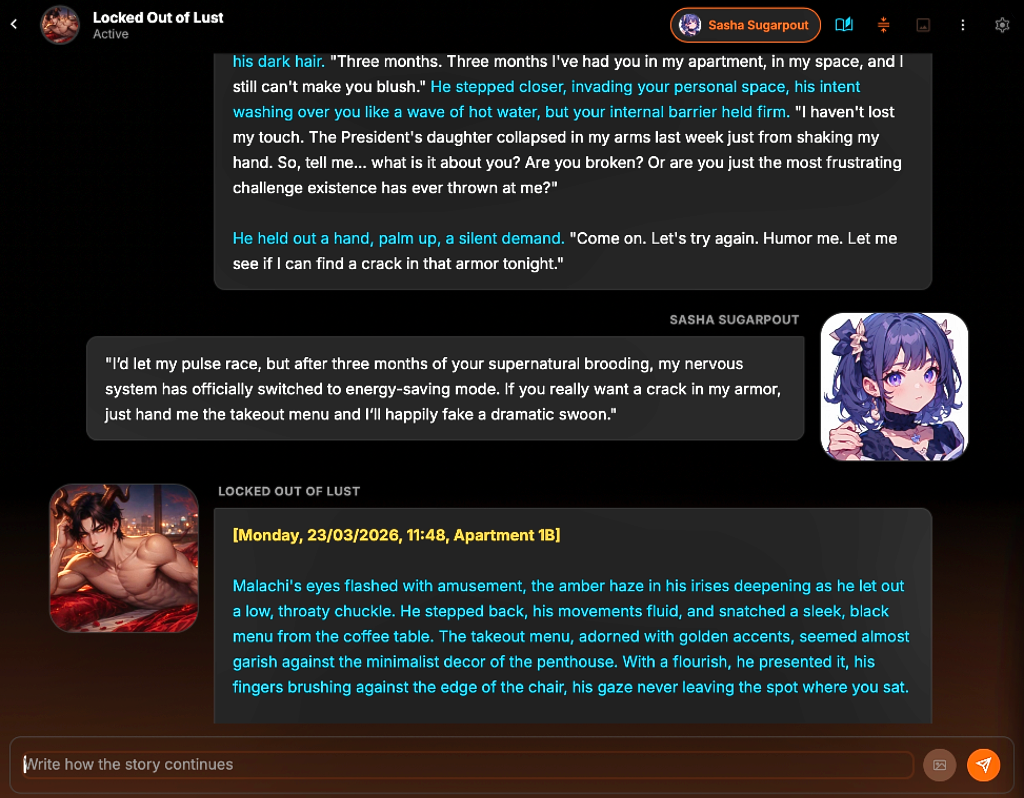
Start Your First Story
Every experience inside AI Scenario is shaped by three systems: scenarios, personas, and AI models. Once you understand how they work together, you can create deeply personalized stories.
Choose a Scenario
Scenarios define the world, characters, tone, opening situation, and narrative style of a story.
- Explore community-made worlds
- Browse genres like fantasy, horror, romance, sci-fi, noir, and drama
- Launch instantly or customize the scenario before starting
Select Your Persona
Your persona represents you inside the story. It controls how characters recognize, describe, and emotionally react to you.
- Create multiple identities for different story types
- Store appearance, personality, and background details
- Maintain relationship continuity across long stories
Pick an AI Model
Different AI models produce different writing styles, pacing, emotional depth, and creativity levels.
- Fast conversational models for lightweight roleplay
- Heavy prose models for cinematic storytelling
- Long-context models for memory-rich stories
You can switch models during a story without losing progress. Experiment to find the tone and pacing you enjoy most.
Core Features
AI Scenario is designed for immersive narrative experiences, not just simple chatbot conversations.
Persistent Memory
Characters remember important events, relationships, and emotional moments across long stories.
Cinematic Narration
Generate atmospheric prose, dramatic scenes, and emotionally reactive dialogue.
Dynamic Personas
Create detailed identities that influence how the world reacts to you.
Scenario Creator
Build your own worlds, characters, opening scenes, and narrative rules.
Scene Image Generation
Generate cinematic visuals during important moments in your story.
Long-Form Roleplay
Designed for extended narrative experiences instead of short chat sessions.
Getting Better Responses
Be Specific
The more detail you give the AI, the stronger and more consistent the responses become.
Write Actions Naturally
Treat the story like collaborative fiction. Describe what your character says, does, notices, or feels.
Use Memory & Personas Together
Personas shape identity. Memory preserves continuity. Together they create believable long-term character relationships.
Use Custom Instructions Sparingly
In Chat Settings, you can add a short set of extra rules the AI should keep in mind for every reply. This is best for tone, hard boundaries, and recurring preferences that matter across the whole chat.
- Good: “Keep character voices restrained and specific.”
- Good: “Treat hidden items as unavailable unless explicitly revealed.”
- Avoid turning it into a second full scenario sheet.